Built for big batches
Files are processed one at a time so memory stays flat, so a large batch of camera photos runs on a low-end phone without crashing. Images too large for the phone to hold safely in memory are skipped with a clear message instead of freezing the device.
On Android: a foreground service
While a batch runs, a notification shows progress and the system keeps the app alive with the screen off (verified on Android 14 and 15). If the phone gets hot during a long batch, ConvertX pauses between files until it cools down.
When it finishes
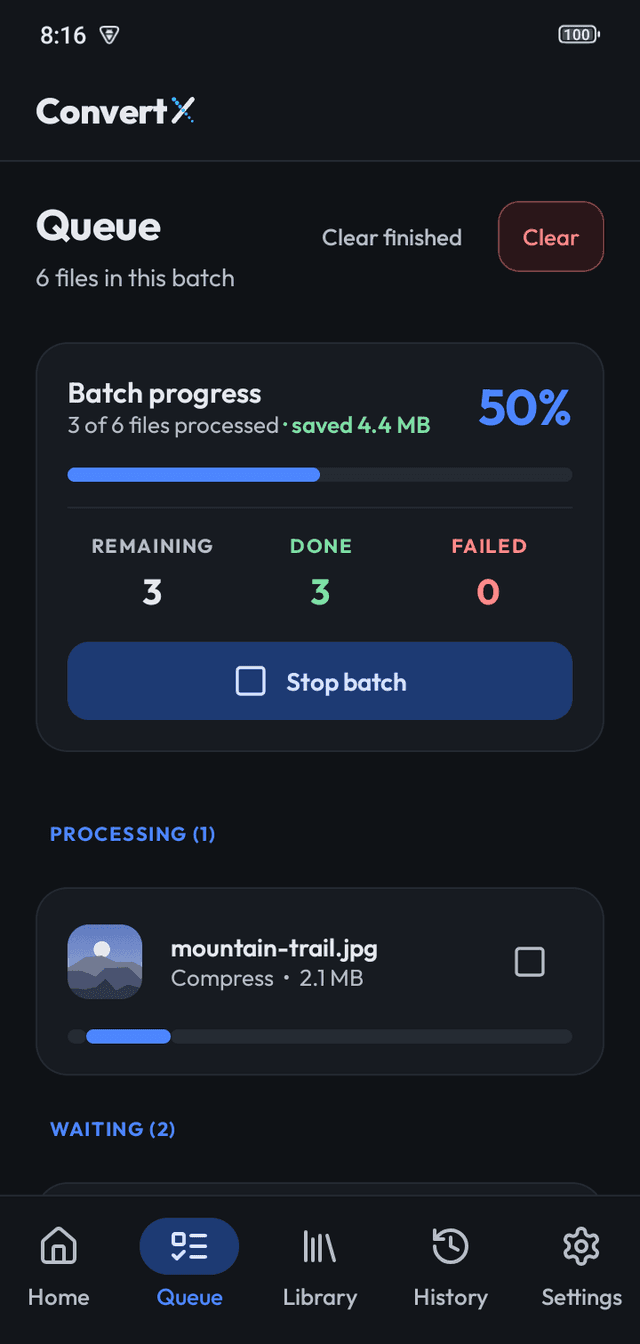
The Queue shows how many files are done, remaining or failed and how much space was saved. Each failed file is listed with a plain-language reason. Finished files can be shared straight from the Queue and are saved to Pictures/ConvertX.
History and Library
History lists every conversion, including failed ones, with sizes before and after. The Library shows every result in a grid with search, date and type filters, sorting, a preview, and share and delete.
Frequently asked questions
Can I add files while a batch is running?
Yes. They join the end of the running batch.
What happens if a file fails?
The batch continues. The Queue and History list the failed file with a reason.
Does it process files in parallel?
One at a time, so memory stays predictable on phones.
More features
- Image ConverterConvert many images at once to WebP, JPG, PNG, AVIF, BMP or TIFF on your device. HEIC on A…
- Image CompressorCompress photos on your device with Light, Balanced, Strong and Maximum presets or lossles…
- PrivacyConvertX processes images on your device, with no ads, no analytics and no Internet permis…